Cross-Document Validation: How Businesses Detect Missing and Mismatched Information
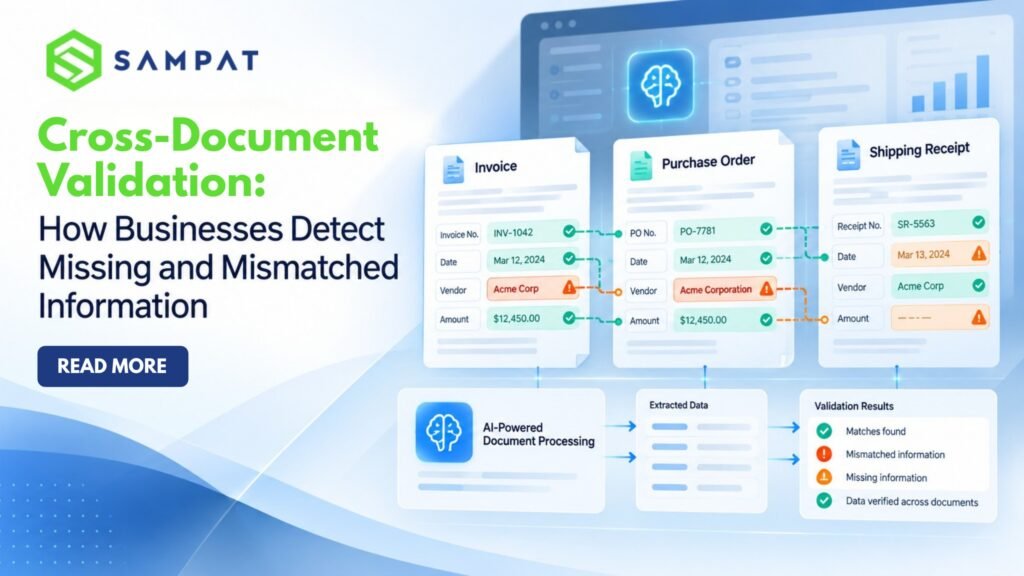
A customer’s name matches the application form, but not the identity document. An invoice shows one amount, while the purchase order reflects another. A university application contains a date of birth that differs from the supporting certificate. Individually, these documents may appear correct. The problem becomes visible only when someone compares them. For businesses processing hundreds or thousands of documents, such discrepancies can lead to delayed approvals, repeated verification, payment errors, and additional administrative work. This is where Cross Document Validation becomes important. Cross-document validation is the process of comparing information across two or more related documents to identify missing details, inconsistent values, and mismatched records. It helps organizations verify whether information submitted through different sources is complete, consistent, and suitable for further processing. As document volumes increase, businesses need a reliable way to perform these checks without depending entirely on manual review.Why Valid Documents Can Still Contain Incorrect Information
A document can be correctly formatted and still contain information that conflicts with another record. Consider a business receiving an invoice from a supplier. The invoice includes the supplier’s name, invoice number, product description, quantity, and payment amount. Everything appears complete. However, the corresponding purchase order specifies a different quantity. Unless both documents are compared, the discrepancy may remain unnoticed. Similar problems occur in employee onboarding, customer verification, insurance processing, and university admissions. The difficulty is that information is often distributed across several documents rather than maintained in a single record. Manual verification requires employees to open each file, locate relevant fields, compare values, and record any differences. This process becomes increasingly difficult when organizations handle scanned documents, PDFs, images, and forms with different layouts. Cross-document validation addresses this challenge by bringing related information together for systematic comparison.How Cross-Document Validation Works
Cross-document validation generally involves extracting relevant information, identifying corresponding fields, and checking whether the values satisfy predefined business rules. A typical workflow includes five stages.1. Document Collection
The organization receives documents through application portals, email, internal systems, or other submission channels. These may include identity documents, application forms, invoices, certificates, purchase orders, or medical records.2. Data Extraction
Optical Character Recognition (OCR) and document processing technologies help convert information from scanned files and images into machine-readable data. For example, the system may extract a person’s name, date of birth, document number, address, or financial amount.3. Field Matching
Corresponding information is identified across related documents. A name entered in an application form may be compared with the name on an identity document. An invoice amount may be checked against a purchase order.4. Validation Against Business Rules
The extracted information is evaluated using predefined requirements. These checks may identify missing mandatory fields, conflicting values, incorrect formats, or discrepancies between submitted documents.5. Exception Review
Documents that pass the configured checks can proceed through the relevant workflow. Records containing discrepancies may be flagged for correction or further review. This approach allows verification teams to concentrate on cases that require attention instead of manually comparing every field.Five Common Document Mismatches Businesses Need to Detect
Not every document error is obvious. Some of the most disruptive problems involve small differences that are easy to overlook during manual verification.| Mismatch type | Example | Potential business impact |
| Personal information mismatch | Different names or dates of birth across application and identity documents | Verification delays and repeated submissions |
| Financial mismatch | Invoice amount differs from the purchase order | Payment disputes and reconciliation issues |
| Missing information | Mandatory field or supporting document is absent | Incomplete applications and processing delays |
| Identification mismatch | Account number or document reference differs between records | Incorrect record association |
| Inconsistent business details | Supplier name or registered address differs across documents | Additional verification and compliance concerns |
Where Cross-Document Verification Matters Most
The need to compare information across documents extends across several industries.Banking and Financial Services
Banks and financial institutions regularly process customer onboarding forms, identity documents, address proofs, and other supporting records. Cross Document Verification can help identify inconsistencies between submitted application information and supporting documentation. For example, an account opening form may contain a customer name that differs from the identity proof. Detecting the discrepancy before further processing allows the verification team to request clarification. Automated checks can support operational efficiency, although they do not replace mandatory regulatory checks or professional judgment.Universities and Educational Institutions
Admissions departments handle application forms, academic certificates, identity documents, and supporting records. A student’s name, date of birth, or academic information may differ between submissions. When verification is performed manually, employees must compare each document individually. A structured validation process can help universities identify missing documents and inconsistent applicant information before completing admission-related reviews. This reduces repeated administrative checks and helps teams manage large application volumes more consistently.Healthcare Organizations
Healthcare document workflows involve patient information distributed across registration forms, medical records, discharge summaries, and insurance documents. Inconsistent patient details or missing information can delay administrative processing. For example, a patient identification number on an insurance form may differ from the corresponding hospital record. Cross-document checks can help identify such discrepancies for review. Because healthcare information is sensitive, organizations must also apply appropriate access controls, confidentiality safeguards, and applicable data protection requirements.Finance and Procurement Teams
Procurement departments frequently compare purchase orders, invoices, delivery records, and supplier information. An invoice may contain a quantity or amount that does not match the approved purchase order. Automated comparisons can flag these differences before payment processing, helping finance teams investigate discrepancies and reduce avoidable reconciliation work.Why Manual Document Verification Becomes Difficult at Scale
Manual verification may be manageable when an organization processes a small number of documents. The challenge changes as transaction volumes increase. Employees must repeatedly locate fields, compare information, record exceptions, and communicate with other departments. Document formats also vary. Some files contain structured tables, while others arrive as scanned images or handwritten forms. These differences make consistent verification more demanding. Manual processes can also produce inconsistent results when different reviewers interpret the same information differently. Document Validation Software helps standardize repeatable checks and identify exceptions using configured validation rules. The objective is not to eliminate human involvement. It is to reduce repetitive comparison work so employees can spend more time resolving complex discrepancies.OCR and Cross-Document Validation: Understanding the Difference
OCR and cross-document validation perform different functions within document processing. OCR converts text from images or scanned documents into machine-readable information. Cross-document validation uses extracted or available data to compare corresponding information across multiple documents. For example, OCR may extract a date of birth from an identity document. Cross-document validation then compares that value with the date of birth entered in an application form. This distinction matters because extracting information accurately does not automatically establish that the information is consistent. Organizations need both reliable data extraction and appropriate validation rules to build an effective document verification workflow.How SAMPAT DocAIT Supports Document Verification and Validation
As businesses handle increasing volumes of documents, manually reviewing every submission becomes difficult to sustain. SAMPAT DocAIT is an AI-powered document processing and validation platform designed to help organizations extract, verify, and process information from business documents. Its capabilities include:- AI-powered OCR and data extraction: Capture relevant information from scanned documents, forms, and other supported files.
- Rule-based document validation: Check extracted information against defined business requirements.
- Cross-document matching: Compare corresponding information across related documents to identify inconsistencies.
- Document completeness checks: Identify missing mandatory information based on configured requirements.
- Signature verification: Support document verification workflows involving signature checks.